
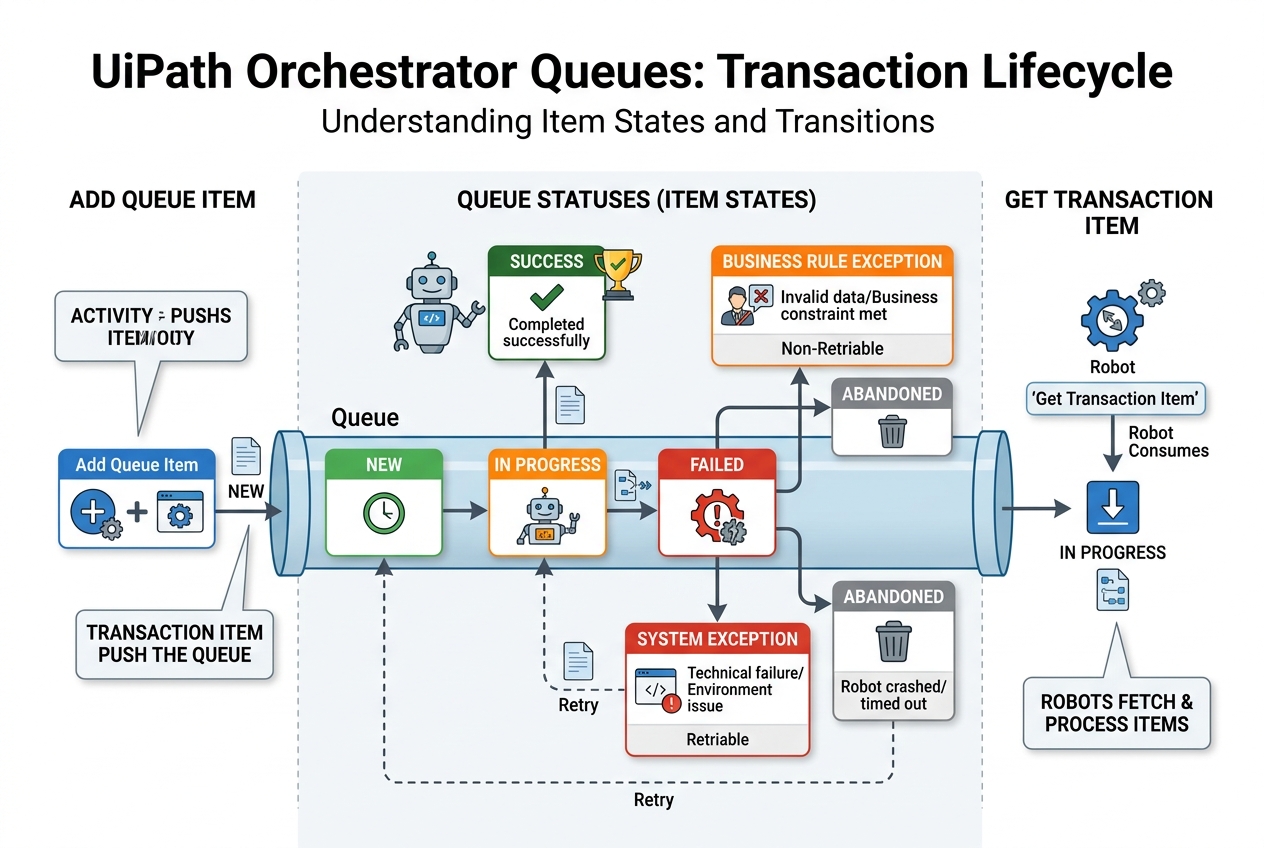
The Vulnerability of Linear Bots
When developers start building Robotic Process Automation (RPA) workflows, they often write linear processes: the bot logs into a system, reads a list of 500 invoices from an Excel sheet, loops through them one-by-one, and logs out.
This works fine in testing, but in production, linear loops are dangerous:
- One Failure Stops Everything: If invoice #45 crashes because of a system exception, the loop breaks, the bot halts, and the remaining 455 invoices are ignored.
- No Load Balancing: You cannot easily distribute the work across multiple robots to process invoices faster.
- Loss of Tracking: If the VM reboots mid-run, you have no way to know which records were completed and which need to be processed again.
To build enterprise-grade, bulletproof bots, you must use UiPath Orchestrator Queues. Let's explore how they work and how to leverage them.
1. What is an Orchestrator Queue?
An Orchestrator Queue is a container hosted on UiPath Orchestrator that holds a list of data records (known as Transaction Items).
Instead of a bot reading a local spreadsheet directly, a process is split into two distinct, decoupled components:
- The Dispatcher: Reads the raw spreadsheet or source data, converts each record into a Queue Item, and pushes it into the Orchestrator Queue.
- The Performer: Pulls one Queue Item at a time from Orchestrator, processes it, and marks it as Successful or Failed.
[Source Data] ➔ [Dispatcher Bot] ➔ [Orchestrator Queue] ➔ [Performer Bot 1]
                                                         ➔ [Performer Bot 2]
                                                         ➔ [Performer Bot 3]
This decoupled pattern is known as the Dispatcher-Performer Model and is the foundational design pattern for enterprise automation.
2. Key Benefits of Using Queues
Integrating Orchestrator Queues provides major architectural benefits for developers:
Auto-Retry on System Exceptions
If the Performer bot crashes while processing an item because a web page crashed or SAP was unresponsive, Orchestrator catches the System Exception and can auto-retry the item. You can set the queue configuration to automatically place the item back into the queue for execution (optionally sending it to a different robot).
Dynamic Load Balancing
If you have 10,000 items in a queue and need them processed quickly, you can spin up 3 separate robots running the exact same Performer code. The robots will query Orchestrator simultaneously. Orchestrator locks items automatically upon request, ensuring no two robots process the same record.
Transaction Isolation
Each transaction item has its own lifecycle. If item #45 fails, it is marked as Failed with a specific error message, and the robot immediately pulls item #46. The overall execution remains uninterrupted.
3. Transaction Item Status Lifecycle
Understanding item states is key to building resilient processing code. Inside Orchestrator, items transit through different states:
| Status | Description |
|---|---|
| New | Item has been added to the queue by the Dispatcher and is waiting to be processed. |
| In Progress | An execution robot has pulled the item and is actively processing it. |
| Successful | The robot completed processing the item and called the Set Transaction Status activity. |
| Failed | The robot hit an error. It is categorized as a Business Exception (e.g. invalid data) or a System Exception (e.g. app crash). |
| Retried | The item failed with a System Exception and has been re-queued for execution. |
4. Setting Status in Studio Code
In UiPath Studio, handling queue items requires a set sequence:
Get Transaction Item: Connects to Orchestrator and retrieves the next item in the queue. This changes the status from New to In Progress and locks the item from other robots.- Process logic: The bot runs the target clicks, entry forms, or calculation steps.
Set Transaction Status: Inside aTry Catchblock, you set the status:- In Try Block: Set status to
Successfulif everything completes. - In Business Exception Catch: Set status to
Failed (Business Exception)to skip retries (as data errors won't resolve by retrying). - In System Exception Catch: Set status to
Failed (System Exception)to log the issue and trigger Orchestrator’s auto-retry logic.
- In Try Block: Set status to
Master Advanced Automation Architectures
Understanding queue orchestration is the boundary line between entry-level scripting and professional workflow engineering. Senior developers rely on Orchestrator queues and the Robotic Enterprise Framework (ReFrameWork) to deploy highly stable, multi-robot systems across large corporations.
If you want to step up to building enterprise-grade automations, check out our Advanced Agentic RPA UiPath course to master queues, framework design, exception handling, and CI/CD pipelines.