
Designing for High-Throughput Automation
When scaling Robotic Process Automation (RPA) in an enterprise, you quickly hit the limitations of running single, linear robots. If your business process demands processing thousands of transactions daily within a tight SLA, relying on one bot is a single point of failure.
To achieve horizontal scaling, high availability, and transaction-level isolation, you must implement a Multi-Bot architecture.
By coordinating multiple robots to work on a single business process in parallel, you can slash execution times from days to hours. Let's explore the prerequisites, the step-by-step implementation, and how to size your multi-bot systems.
Chapter 1: Core Prerequisites
Before writing any code or provisioning machines, you must group your requirements across four core dimensions: platform, infrastructure, application, and process.
1. Platform Requirements (UiPath Orchestrator)
Orchestrator acts as the central control plane. You need:
- Tenant/Folder structures to isolate resources.
- Robots/Robot Accounts mapped to target directories.
- Machines or Machine Templates to define VM connections.
- Queues to distribute transaction items.
- Assets and Credentials stored securely.
- Triggers to start jobs dynamically.
- Monitoring tools to audit logs.
2. Robot Execution Capacity & Licensing
Ensure you have sufficient unattended execution slots (licenses) to run bots in parallel. The orchestrator must have concurrent execution permissions. Additionally, consider licensing for the third-party software (SAP, Citrix, Oracle) that the bots will log into.
3. Queue Definitions
You should define:
- Queue schema/data structure (what keys the bots read).
- Unique Reference policy to prevent duplicate processing of the same invoice or ID.
- SLA and priority requirements to bubble up critical records.
4. Parallelizable Processes (The Key Rule)
A process is a candidate for Multi-Bot architecture only if transactions are independent of one another.
- Good Candidate: Processing invoices.
Invoice 1,Invoice 2, andInvoice 3do not depend on each other and can be processed in any order. - Poor Candidate: Sequential dependencies. If
Transaction 2requires data generated byTransaction 1before it can begin, parallel execution will result in concurrency errors.
5. Application Concurrency Support (Often Overlooked)
The target application must support multiple concurrent sessions. If the system is a mainframe terminal that logs out User A when User B logs in using the same system role, you cannot run multiple bots. Check if:
- SAP allows multiple concurrent logins.
- Citrix/VDI environments permit concurrent sessions.
- The backend API or database has sufficient connection pool capacity.
Chapter 2: Step-by-Step Implementation
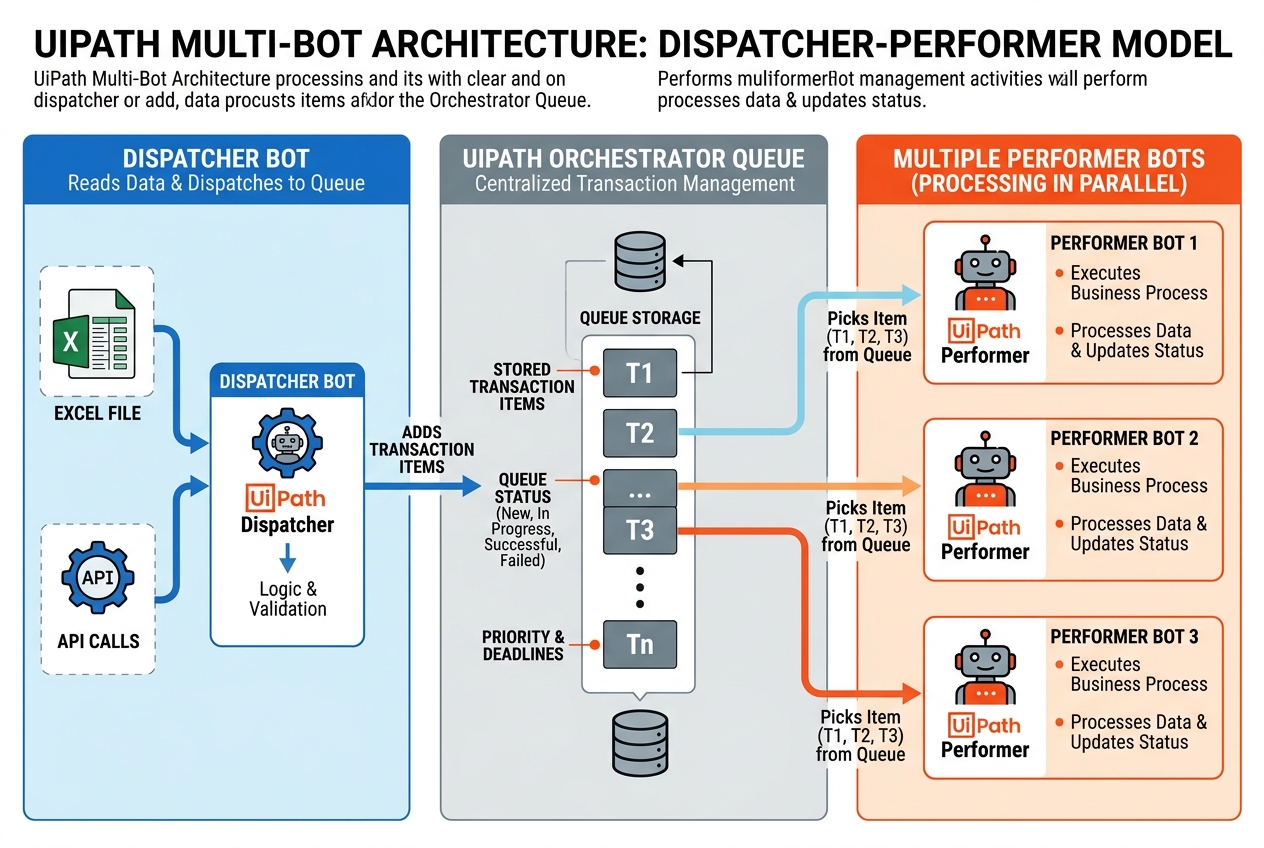
A standard Multi-Bot system uses the Dispatcher-Performer Model to decouple data gathering from actual application processing.
Input Excel / API ➔ [Dispatcher Bot] ➔ [UiPath Queue] ➔ [Performer Bot 1]
                                                      ➔ [Performer Bot 2]
                                                      ➔ [Performer Bot 3]
Step 1: Identify and Split the Process
Break down your process into two distinct workflows:
- The Dispatcher: Collects and validates the raw input, then adds items to the queue.
- The Performer: Pulls items from the queue and processes them in target applications.
Step 2: Build the Dispatcher Bot
The Dispatcher does not interact with the main business application. Its only role is to read input files and write queue items.
A typical Dispatcher loop:
Read Input File (Read Range)
     ↓
For Each Row in DataTable
     ↓
Validate Row Structure
     ↓
Add Queue Item (Write to Orchestrator Queue)
By keeping the Dispatcher fast and lightweight, you ensure that the entire workload is loaded into the queue immediately, ready for the Performers.
Step 3: Build the Performer Bot
The Performer runs on the target execution machine. It queries Orchestrator for the next available item, processes it, and marks the status.
In UiPath Studio, the core Performer flow is structured around:
Get Transaction Item (Retrieve from Queue)
     ↓
Process Transaction (Run clicks and type-ins)
     ↓
Set Transaction Status (Mark Success or Fail)
Using the Robotic Enterprise Framework (REFramework) is highly recommended for the Performer, as it comes pre-built with queue transaction loops, config reading, and global exception catching.
Chapter 3: Scalability & Concurrency
Instead of manually assigning specific records to each bot (which creates rigid, fragile schedules), the queue distributes the workload dynamically.
                     20,000 Queue Items (Orchestrator)
                                    │
        ┌───────────────────────────┼───────────────────────────┐
        ↓                           ↓                           ↓
   [Robot 1]                   [Robot 2]                   [Robot 3]
  Takes Item 1                Takes Item 2                Takes Item 3
  (Status: In Progress)       (Status: In Progress)       (Status: In Progress)
Upon executing Get Transaction Item, Orchestrator locks that specific item, setting its status to In Progress. Other bots querying the queue are given the next available New item. This provides seamless, horizontal scalability: if you need to process transactions faster, you simply spin up another robot instance, and it immediately starts taking items without code changes.
Chapter 4: Exception & Retry Strategy
When running multiple bots in parallel, you must design a robust exception handling policy. Group exceptions into two distinct categories:
1. Business Exceptions
These represent data validation failures (e.g., invoice total is negative, or customer email is invalid).
- Action: Mark the item as Failed (Business Exception).
- Retry Policy: Do not retry. Retrying will produce the same error since the data itself is incorrect.
2. Application (System) Exceptions
These represent environment failures (e.g., SAP crashed, network timed out, or a browser selector failed to load).
- Action: Mark the item as Failed (Application Exception).
- Retry Policy: Trigger a retry. Re-queue the item to be processed again. The next available bot (or the same bot after restarting the applications) will attempt to process it.
System Exception Occurs
          ↓
   Auto-Retry Enabled?
     ┌────┴────┐
    Yes       No
     ↓         ↓
Re-Queue Item   Mark Failed
Chapter 5: Sizing & Sizing Calculation
When starting a project, do not guess the number of bots you need. Use this calculation model:
$$\text{Transaction Volume} \rightarrow \text{Average Processing Time} \rightarrow \text{SLA Limit} \rightarrow \text{Target Bots}$$
Example Sizing Calculation:
- Total Transactions: 10,000
- Average Processing Time (APT) per transaction: 3 minutes (0.05 hours)
- Required SLA (Time Window): 8 hours
First, calculate the total processing hours required: $$\text{Total Hours} = 10,000 \times 0.05 \text{ hours} = 500 \text{ hours}$$
Now, divide by your SLA limit to find the number of parallel executors needed: $$\text{Bots Needed} = \frac{500 \text{ hours}}{8 \text{ hours}} = 62.5 \text{ bots}$$
Accounting for a 20% buffer (for system latency, retries, and application startups): $$\text{Total Bots (with buffer)} = 62.5 \times 1.2 = 75 \text{ bots}$$
This calculation proves you need 75 parallel execution VM slots to meet your 8-hour SLA.
Chapter 6: Interview Prep Summary
If you are preparing for an RPA Architect or Senior Developer interview, use this structured explanation to explain Multi-Bot architectures:
“To implement a Multi-Bot architecture in UiPath, I use Orchestrator as the central controller and Queues for dynamic workload distribution. I split the process into a Dispatcher (which reads source data and adds items to the queue) and multiple Performers (which run in parallel on separate VMs using the REFramework). Each Performer calls
Get Transaction Itemto dynamically lock and process a record, ensuring zero task overlaps. We categorize exceptions into Business Exceptions (no retry) and System Exceptions (auto-retry). This setup provides horizontal scalability, error isolation, and centralized monitoring.”
Prerequisites Checklist
| Component | Required? | Purpose |
|---|---|---|
| Orchestrator | Yes | Handles machine provisioning, logs, assets, and queue statuses. |
| Parallel Executor Slots | Yes | Licensing capacity for concurrent robot runs. |
| Orchestrator Queues | Yes | Dynamically locks and distributes transactions to prevent duplicates. |
| Independent Transactions | Yes | The process steps must not have sequential dependencies. |
| Application Concurrency | Yes | Target systems must allow multiple simultaneous user logins. |
| Windows VM Infrastructure | Yes | Appropriate CPU, memory, and runtime environments for unattended runs. |
| Secure Assets | Yes | Storing login credentials safely inside Orchestrator Assets. |