
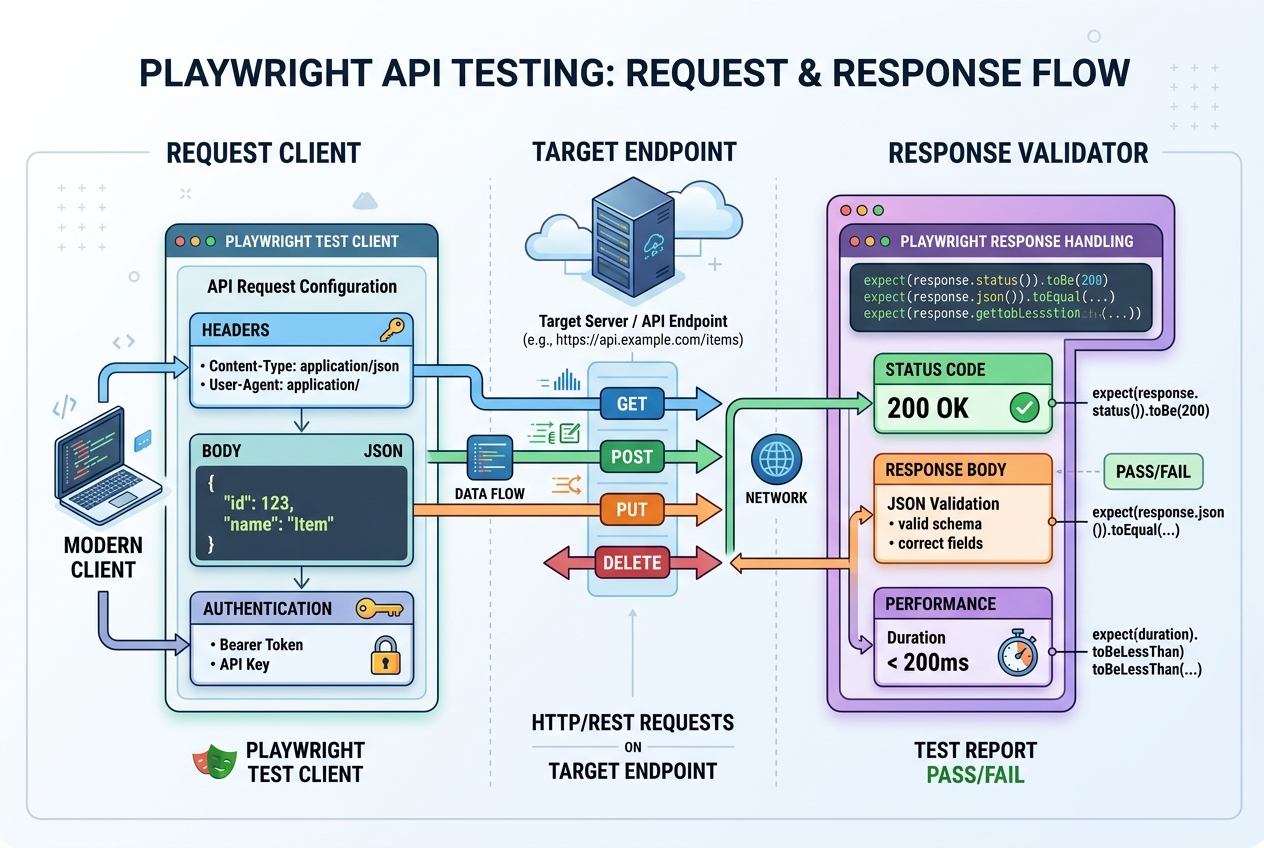
Why Integrate API Testing into Your UI Framework?
Most QA engineers know Playwright as a powerful UI automation tool that clicks buttons, fills out forms, and asserts page states. But a modern QA automation framework needs to do more than just test the browser interface.
Relying solely on UI tests makes your test suite slow and prone to UI changes. By incorporating API testing directly into your test suites, you can:
- Validate Backend Logic Directly: Test business calculations and endpoint permissions without waiting for UI elements to render.
- Speed Up Pre-test Setup: Seed test databases or create user accounts via API requests in milliseconds instead of clicking through registration forms.
- Verify API Responses: Assert that payload structures, HTTP headers, and JSON keys match the server contract.
Playwright has native support for API testing. Let's look at how to build API tests and orchestrate them with UI interactions.
1. Writing Your First Playwright API Test
Playwright exposes a native request fixture that handles sending HTTP requests. Here is how to write a simple test case to validate a GET endpoint:
import { test, expect } from '@playwright/test';

test('should retrieve user details from API', async ({ request }) => {
  // Send a GET request to the endpoint
  const response = await request.get('https://api.example.com/users/123');

  // Verify the HTTP response status code
  expect(response.status()).toBe(200);

  // Parse the response body as JSON
  const body = await response.json();

  // Assert specific keys and data values
  expect(body.id).toBe(123);
  expect(body.name).toBe('Alex Jensen');
  expect(body.role).toBe('admin');
  expect(body.status).toBe('active');
});
2. Sending POST Requests with JSON Payloads
To create resources or submit forms via API, you send a POST request containing a body payload. Playwright makes passing JSON headers and data structures straightforward:
test('should create a new user profile via POST', async ({ request }) => {
  const newUser = {
    name: 'Alex Jensen',
    email: '[email protected]',
    role: 'admin'
  };

  const response = await request.post('https://api.example.com/users', {
    data: newUser,
    headers: {
      'Content-Type': 'application/json'
    }
  });

  expect(response.status()).toBe(201);

  const body = await response.json();
  expect(body).toHaveProperty('id');
  expect(body.name).toBe(newUser.name);
});
3. Combining UI and API Tests (The Hybrid Workflow)
The true superpower of Playwright is combining API calls and UI assertions in a single test case.
Instead of typing credentials into the login page (UI), you can fetch authentication cookies via API, inject them into the browser context, navigate straight to the dashboard, and verify a chart.
Example: Hybrid Setup and Assert Verification
test('hybrid flow: update profile and verify in UI', async ({ request, page }) => {
  // 1. API: Quick update to database profile data
  const patchResponse = await request.patch('https://api.example.com/users/123', {
    data: { name: 'Alex Updated' }
  });
  expect(patchResponse.status()).toBe(200);

  // 2. UI: Navigate to settings page in the browser
  await page.goto('https://example.com/settings');

  // 3. UI: Assert the UI immediately reflects the backend change
  const inputLocator = page.locator('#profile-name-input');
  await expect(inputLocator).toHaveValue('Alex Updated');
});
4. Best Practices for Playwright API Testing
To build stable API testing structures:
- Global BaseURL Configuration: Define your base API URL in
playwright.config.tsunderuse.baseURLso you don't repeat domain strings in individual test files. - Schema Validation: Use schema validation libraries (like AJV or Zod) to assert that entire JSON responses conform to the expected format, validating hundreds of keys in one assertion.
- Clean Data Teardown: If your test creates user records, write a cleanup block (in
test.afterEach) to delete created entries via API calls, keeping test databases clean.
Advance Your Automation Engineering Career
Mastering both UI browser automation and backend API validation makes you an incredibly valuable QA Engineer. High-performing software teams favor automated suites that run fast, use API shortcuts, and provide deep integration checks.
If you are looking to level up your testing expertise, join our Playwright TypeScript Masterclass to master advanced config parameters, custom fixtures, API integration, and headless CI/CD runs.